WooCommerce · Back-in-stock alerts

Email them the moment it's back

When a product sells out, a notify-me form appears on its page. The moment you restock, everyone waiting gets an automatic email — sent in the background, so it scales without timing out. Pro turns that waiting list into recovered revenue: urgency coupons, SMS & WhatsApp, marketing sync and webhooks.

14-day money-back guaranteeFree core — coming to WordPress.orgPart of the Australcode family
An out-of-stock product page with the notify-me form: product photo, price, email field, consent checkbox and a Notify me when available button
PHP 8.2+ · WordPress 6.5+ · WooCommerce 8.0+Simple and variable products — per-variation waitlistsBackground sending via Action Scheduler100% on your server — wp_mail / your SMTP, no third partyFree core · secure checkout by Freemius
What it does

Built for real WooCommerce stores

Restock email

Restock, and everyone hears about it

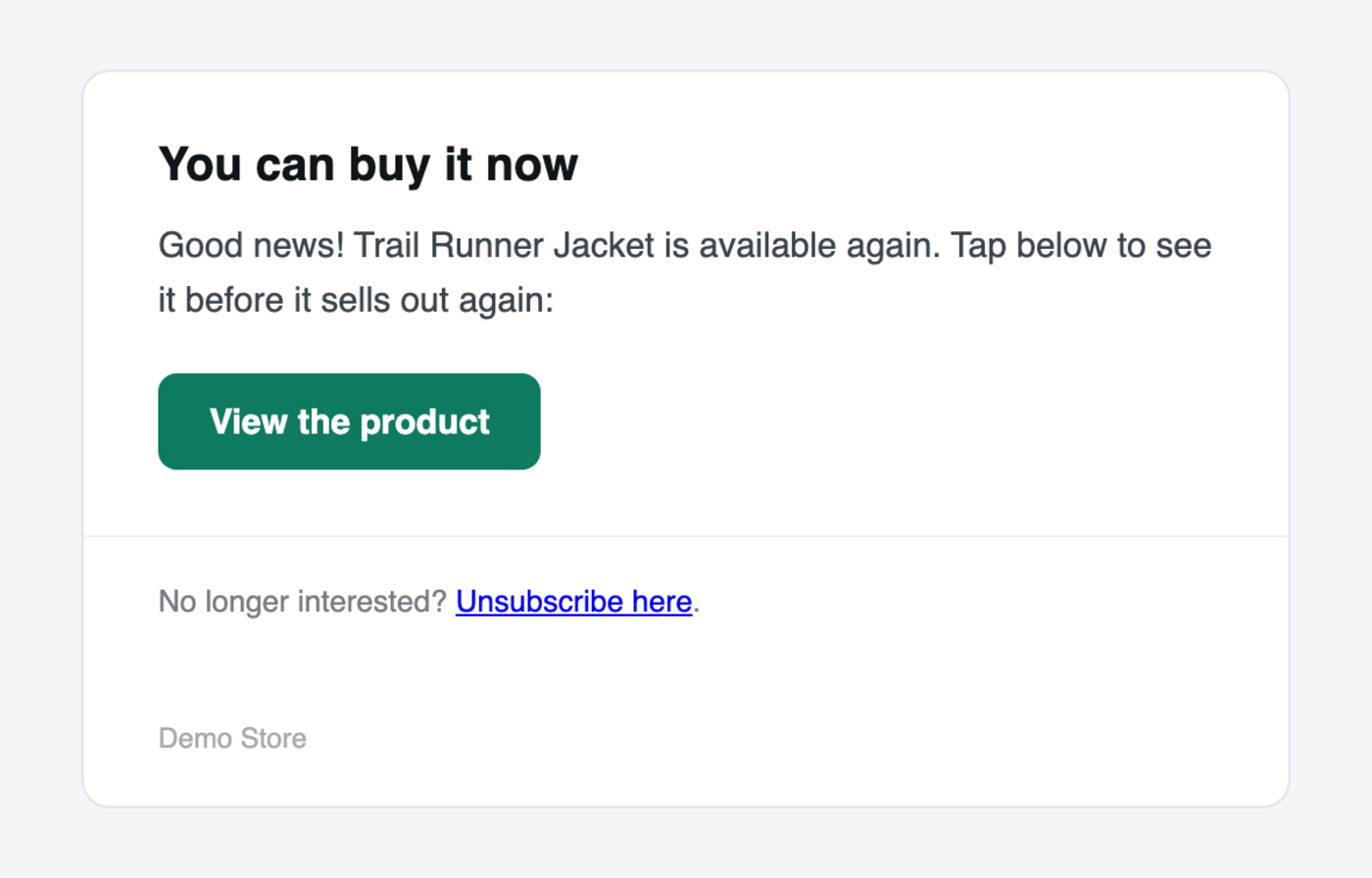
Add stock anywhere — the product editor, a CSV import, an ERP or API sync, WP-CLI. The plugin queues the waitlist in Action Scheduler and emails everyone in background batches of 50 — each email carries the product's photo, price and a link straight to it.

  • Each batch re-checks the product is still in stock before sending
  • Tokenized one-click unsubscribe in every email
  • Sent via wp_mail / your own SMTP — no third party
The automatic restock email: a You can buy it now heading, a product card with the item's photo and price, a View the product button and an unsubscribe link
Subscriber list

See exactly who is waiting

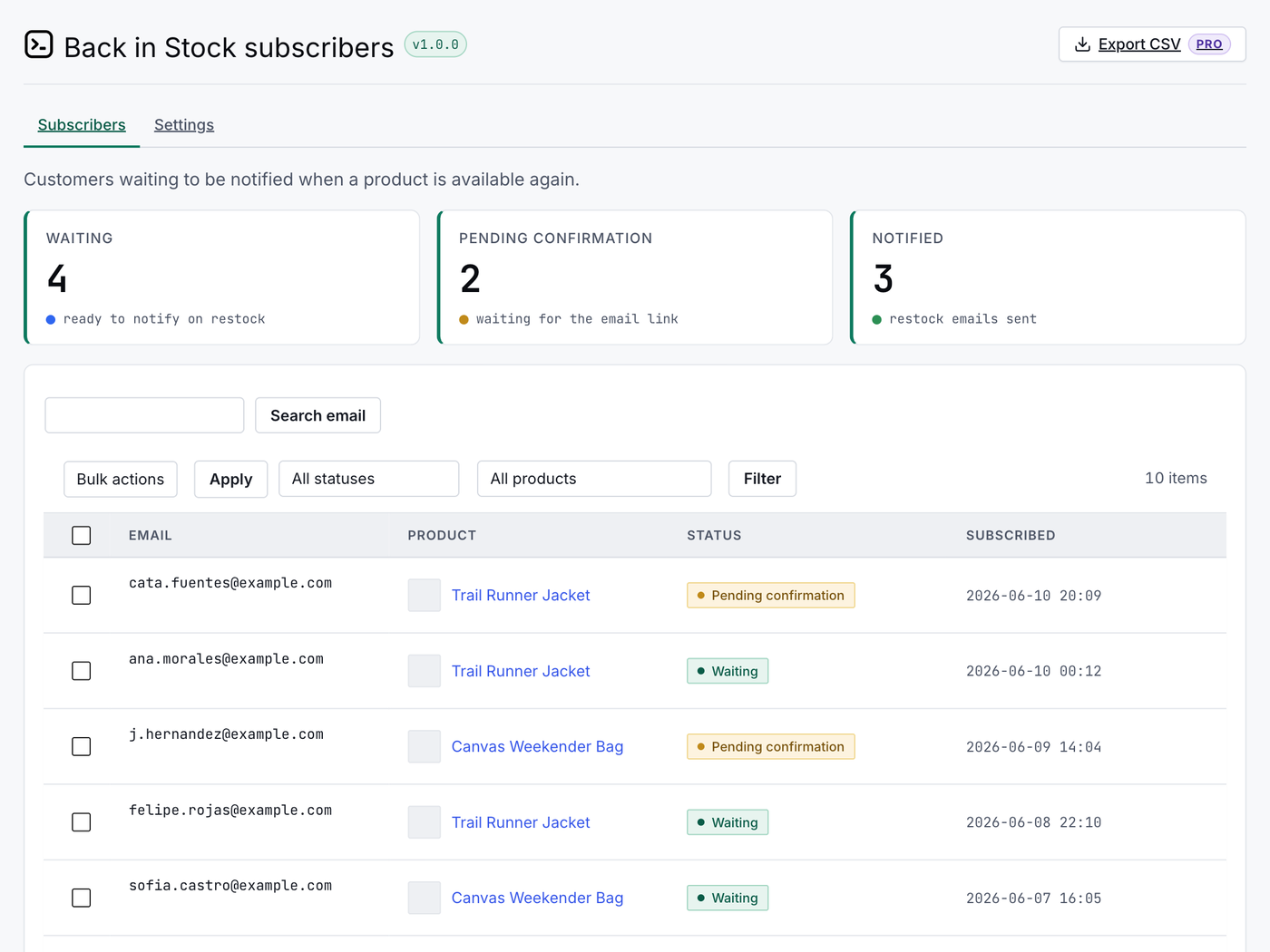
Every signup lands in a per-product list in wp-admin — KPI cards for waiting, pending confirmation and notified, status filters and email search, plus a Top demand panel ranking the products the most people are waiting for. No more guessing what to restock first.

  • KPIs at a glance: waiting · pending confirmation · notified
  • Filter by product or status, search by email
  • One-click CSV export (Pro)
The subscriber list in wp-admin: KPI cards for waiting, pending confirmation and notified, a Top demand panel ranking the most-wanted products, plus filters and email search
Your rules

Tuned from one settings screen

Double opt-in, consent checkbox, button label, email subject and heading — every option ships with an inline recommendation, so you know what to pick and why.

  • Double opt-in on by default — confirmed addresses only
  • Consent wording you control (privacy-law friendly)
  • Re-theme the form with --acbis-* CSS tokens
The settings screen: double opt-in, out-of-stock variations and explicit consent toggles, each with an inline recommendation
Pro · turn demand into revenue

The waiting list, turned into recovered sales

The free loop captures demand. Pro acts on it — recover the sale with a coupon, reach customers on every channel, sync to your marketing platform and wire the signal into your stack.

Restock coupons + recovered revenue

Recover the sale with an urgency coupon

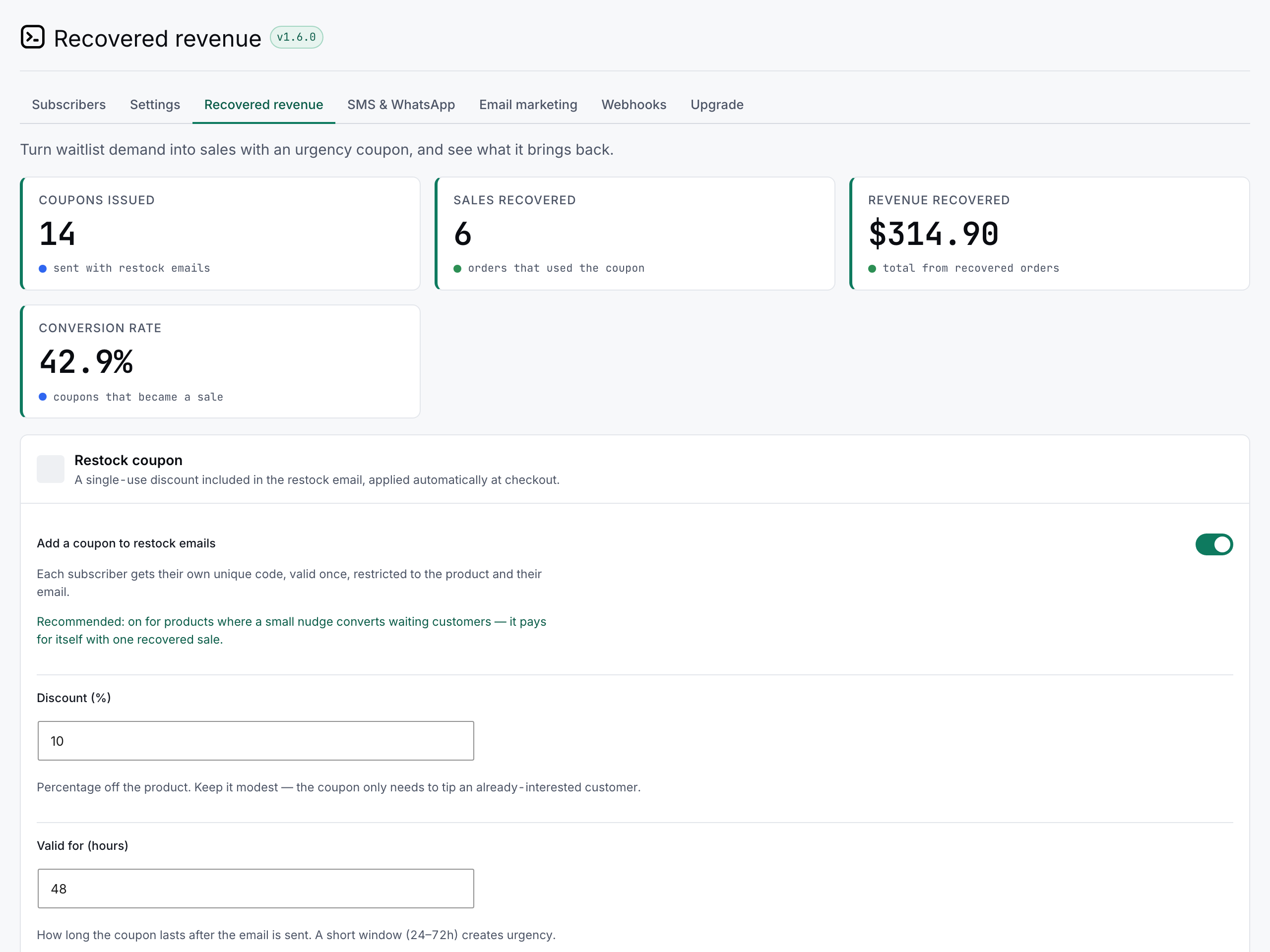
Every restock email can carry a unique, single-use discount, applied automatically at checkout — restricted to that product and that customer, and expiring after the window you choose. A dashboard then attributes paid orders back to those coupons, so you see exactly how many sales and how much revenue the waiting list brought back.

  • A unique single-use code per subscriber, auto-applied at checkout (Pro)
  • Set the discount and a short expiry window that creates urgency
  • Recovered-revenue dashboard: coupons issued, sales recovered, revenue and conversion rate
The Recovered revenue dashboard in wp-admin: KPI cards for coupons issued, sales recovered, revenue recovered and conversion rate, above the restock-coupon settings
SMS & WhatsApp

Reach them on their phone, not just their inbox

Restock alerts can also go out by SMS and WhatsApp through your own Twilio account — opt-in only, sent to customers who added a phone number and ticked a separate consent box. Bring your own credentials; they are stored encrypted.

  • SMS and WhatsApp through your own Twilio account (Pro)
  • Opt-in with separate phone consent — sent in addition to the email
  • Your own message template with {product}, {link} and {store}
The SMS and WhatsApp settings in wp-admin: encrypted Twilio credentials, with the SMS and WhatsApp channels both enabled and their sender numbers
Email-marketing sync

Push every signup to your marketing platform

Every back-in-stock subscriber is added to your Klaviyo list or Mailchimp audience automatically — bring your own API key — so you can build flows and segments around real, proven demand instead of guesswork.

  • Automatic sync to Klaviyo or Mailchimp (Pro)
  • Bring your own API key — stored encrypted, never in clear text
  • Each new subscriber syncs in the background on signup
The Email marketing settings in wp-admin: Klaviyo and Mailchimp each enabled, with an encrypted API key and a list or audience ID
Webhooks & demand alerts

Wire it into your stack, and watch demand

A signed JSON webhook fires on every signup and restock — point it at Zapier, Make, n8n or your own endpoint. And when a product passes a demand threshold you set, your team gets a Slack or Discord ping, so the most-wanted restocks never slip by.

  • Signed webhook (HMAC-SHA256) on every signup and restock (Pro)
  • Works with Zapier, Make, n8n or any endpoint you control
  • Slack/Discord alert when waiting customers cross your threshold
The Webhooks settings in wp-admin: an outgoing webhook URL with its HMAC signing secret, plus a Slack or Discord demand-alert URL with a waiting-customers threshold
Everything included

The full toolbox

Everything here is free; the five Pro tools below turn the waiting list into recovered revenue.

"Notify me" form

A subscribe form appears automatically on any out-of-stock product page — no setup.

Variable products

The form reveals when a sold-out variation is selected, and notifies only that variation's waitlist.

Shortcode + block

Drop [acbis_back_in_stock_form] or a Gutenberg block anywhere — works where the WooCommerce hook does not fire. Add mode="product" for popups and page builders (Elementor, Divi).

Double opt-in

Optional email confirmation before a customer joins the list. On by default.

Consent checkbox

Optional explicit-consent box for privacy-law compliance, with your own wording.

Background sending

Emails go out through Action Scheduler in batches of 50 — hundreds of subscribers, no timeout.

One-click unsubscribe

A secure tokenized link in every email. No account, no login required.

Subscriber list

A per-product list in wp-admin with KPIs, status filters and email search.

Custom email text

Configurable subject and heading for confirmation and restock emails, with {product} and {store} placeholders.

Any restock vector

Manual edits, CSV imports, API/ERP sync, WP-CLI — every standard restock triggers a notification.

Anti-abuse built in

Nonce, honeypot and per-IP rate limiting. The IP is hashed, never stored in clear text.

Cache & CDN proof

The form fetches a fresh security token at submit time, so it keeps working behind full-page edge caches like Cloudflare and Kinsta.

Developer hooks

PHP actions and filters (acbis_after_subscribe, acbis_email_args) plus an acbis:subscribed JavaScript event — wire signups into your CRM, analytics or email tool.

Restock coupons

Add a unique, single-use discount to each restock email, applied automatically at checkout — restricted to the product and the customer, expiring after the window you choose. Pro.

Recovered-revenue tracking

A dashboard that attributes paid orders back to your restock coupons, so you see exactly how many sales and how much revenue the waiting list brings back. Pro.

SMS & WhatsApp alerts

Reach customers on their phone too, through your own Twilio account. Opt-in only: the customer adds their number and ticks a separate consent box. Pro.

Email-marketing sync

Every subscriber is automatically added to your Klaviyo list or Mailchimp audience (bring your own API key), so you can build flows around real back-in-stock demand. Pro.

Webhooks & demand alerts

Fire a signed JSON webhook on every signup and restock (Zapier, Make, n8n or your own endpoint), and get a Slack/Discord ping when a product passes a demand threshold you set. Pro.

CSV export

Export the full subscriber list — email, product, status and dates — to CSV. Pro.

Setup

Running in 3 minutes

01

Install & activate

Upload the plugin or install it from the Plugins screen. WooCommerce active is the only requirement — no code, no config files.

02

Review the settings

Double opt-in, consent checkbox, button label and email texts — every option ships with an inline recommendation. The defaults fit most stores.

03

Restock as always

The form shows on any sold-out product automatically. When you restock — admin, CSV import, API sync or WP-CLI — everyone waiting gets the email.

50
emails per background batch — restocks never time out
256-bit
tokenized confirm & unsubscribe links — no accounts
100%
sent from your server — wp_mail / your own SMTP
5
Pro tools that recover the sale: coupons, revenue tracking, SMS/WhatsApp, marketing sync, webhooks
The alternative

Versus notifying by hand

A customer who wanted to buy hit a sold-out product and left. The demand exists — most stores just have no way to bring that customer back.

Capability By hand Back In Stock
A "Notify me" form on every sold-out product — and per variation
Demand recorded where you can see it (list, KPIs, filters) Notes & memory
Restock email goes out the moment stock returns When you remember
Covers midnight restocks, CSV imports and API syncs
Hundreds of waiting customers without timing out batches of 50
Opt-in confirmation and consent records
One-click unsubscribe in every email
Time spent per restock Yours Zero

Every capability above ships in the free version. Pro adds the tools that recover the sale: restock coupons, a recovered-revenue dashboard, SMS and WhatsApp, marketing sync and webhooks.

See pricing
Pricing

Free is the whole loop. Pro turns it into revenue.

Free

The complete loop
$0forever
  • Notify-me form (simple + variable)
  • Automatic restock email
  • Background sending at scale
  • Subscriber list, KPIs + filters
  • Double opt-in + consent checkbox
  • One-click unsubscribe
  • Pro tools: coupons, recovered revenue, SMS/WhatsApp, ESP sync, webhooks
Get the free version
MOST POPULAR

Pro · Single

For one store
$39/year · 1 site
  • Everything in Free
  • Restock coupons — auto-applied urgency discount in every restock email
  • Recovered-revenue dashboard — attribute sales back to the waitlist
  • SMS & WhatsApp alerts via your own Twilio account
  • Sync subscribers to Klaviyo or Mailchimp
  • Signed webhooks + Slack/Discord demand alerts
  • One-click CSV export — email, product, status, dates
  • 1 site activation
  • Updates while licensed
  • Email support
Get Pro

Pro · 5 Sites

For a handful of stores
$99/year · 5 sites
  • Everything in Free
  • Restock coupons — auto-applied urgency discount in every restock email
  • Recovered-revenue dashboard — attribute sales back to the waitlist
  • SMS & WhatsApp alerts via your own Twilio account
  • Sync subscribers to Klaviyo or Mailchimp
  • Signed webhooks + Slack/Discord demand alerts
  • One-click CSV export — email, product, status, dates
  • 5 site activations
  • Updates while licensed
  • Email support
Get 5 Sites

Pro · Unlimited

Agencies & networks
$199/year · unlimited
  • Everything in Free
  • Restock coupons — auto-applied urgency discount in every restock email
  • Recovered-revenue dashboard — attribute sales back to the waitlist
  • SMS & WhatsApp alerts via your own Twilio account
  • Sync subscribers to Klaviyo or Mailchimp
  • Signed webhooks + Slack/Discord demand alerts
  • One-click CSV export — email, product, status, dates
  • Unlimited site activations
  • Updates while licensed
  • Email support
Get Unlimited
All plans include:simple & variable productsdouble opt-in + consentbackground sending via Action Schedulerone-click unsubscribesubscriber data stays on your server
🛡️ 14-day money-back guarantee — unconditional, handled by Freemius.
FAQ

Before you ask

Does it work with variable products?
Yes. For variable products the form appears when the customer selects an out-of-stock variation, and it notifies only the people waiting for that specific variation — not everyone on the parent product.
Will it send hundreds of emails at once and time out?
No. Sending runs in the background through Action Scheduler (bundled with WooCommerce) in batches of 50, re-queuing automatically until everyone is notified. It also re-checks that the product is still in stock before each batch, so a stock that drops back to zero mid-send does not email a sold-out product.
Do my customers need an account?
No. They only leave an email. Confirmation and unsubscribe both work through secure tokenized links (256-bit tokens), so there is no login and no password anywhere in the flow.
Will it work with Bricks, Elementor, Divi or a block theme?
Yes. Besides the automatic WooCommerce hook, the form ships as a shortcode ([acbis_back_in_stock_form]) and a Gutenberg block, both rendered by the same engine. So if your builder's product template does not fire the standard WooCommerce hook, you can place the form yourself anywhere on the page. For popups or modals away from the product page, add mode="product" so the form captures at the product level.
Does the form work behind page caching or a CDN?
Yes. Submissions go through AJAX and the form fetches a fresh security token at submit time, so it keeps working even on stores with full-page edge caching (Cloudflare, Kinsta and similar) — a stale cached page no longer breaks the form silently.
Does it send my customers' data anywhere?
No. Restock emails are sent from your own site (wp_mail / your SMTP), and your subscribers' data stays in your database. The IP used for anti-abuse rate limiting is stored hashed, never in clear text. The plugin only contacts Freemius for license validation and update checks — never with your customers' data, and only if you opt in or activate a license.
What triggers a restock notification?
Any standard WooCommerce stock change back to "in stock": editing the product in wp-admin, a bulk CSV import, an inventory sync from an ERP or POS over the API, or WP-CLI. The plugin listens to WooCommerce's own stock hooks, so it does not matter how the stock came back.
What exactly is in Pro versus Free?
Free is the whole loop: the notify-me form on simple and variable products, double opt-in, consent, the automatic restock email, background sending, the subscriber list with filters, and one-click unsubscribe. Pro adds the tools that turn the waiting list into revenue: restock coupons (auto-applied urgency discounts), a recovered-revenue dashboard, SMS & WhatsApp alerts via your own Twilio, automatic sync to Klaviyo/Mailchimp, signed webhooks with Slack/Discord demand alerts, and one-click CSV export. No core feature is locked behind Pro.
Is the free version crippled? What's the catch?
No catch. The free version is a complete back-in-stock system for a real store — no subscriber cap, no daily quota, no nag screens. Pro adds the tools to act on that demand — recover sales with coupons, reach customers by SMS/WhatsApp, sync to your email platform and wire it into your stack. We sell the tools that grow on top of the core promise, not the promise itself.
Do the Pro integrations send my customers' data to third parties?
Only the ones you switch on, and only with your own credentials. SMS & WhatsApp (Twilio), email-marketing sync (Klaviyo/Mailchimp) and webhooks are all off by default and opt-in — you bring your own account or endpoint. An SMS or WhatsApp message goes out only to customers who gave separate phone consent. API keys are stored encrypted, and the free version never sends subscriber data anywhere. You decide exactly what leaves your site.
Can I restyle the form to match my theme?
Yes. The button label is configurable in Settings, and the form exposes --acbis-* CSS custom properties (accent, button colors) so you can re-theme it from your own stylesheet without touching the plugin.
Is it WooCommerce HPOS compatible?
Yes. The plugin declares compatibility with WooCommerce High-Performance Order Storage. It does not touch orders — it stores subscriptions in its own table — but the declaration keeps WooCommerce's compatibility screen clean.
Can I get a refund?
14 days, no questions asked. Email info@australcode.io with your order number and the refund is issued through Freemius, our Merchant of Record.
Australcode family

More plugins for your store

Uniform Images

Every product image, perfectly uniform — AVIF & WebP, processed locally.

Learn more →

Points & Rewards

Loyalty points that bring customers back.

Learn more →

Product Reviews

Reviews that build trust and convert.

Learn more →

australcode.io

Never lose a sale to sold out

The complete back-in-stock loop, free. Pro from $39/year turns the waiting list into recovered revenue — 14-day unconditional guarantee.

Get Back In Stock Pro